

Object Based Synthetic Dataset Generation
Goal: Generate a labeled COCO instance-segmentation dataset of mechanical parts floating in mid-air, adding one kind of variation at a time.
Level: Beginner
Time: ~10 minutes
SUMMARY
Object based synthetic dataset generation scatters objects in free space and randomizes everything else around them, which makes them a fast way to teach a detector what a part looks like from every angle. You will build the randomizer in four steps and render after each one, so you can see what every node adds.
This tutorial uses telekinesis-illusion 0.3.2. It runs from any directory; the example assets download on first use.
Step 1: Parts in Mid-Air
Register four parts and a light, then make two decisions per scene: which parts appear, and where.
import numpy as np

from telekinesis.illusion import config
from telekinesis.illusion.core.engine import BlenderEngine
from telekinesis.illusion.core.environment import Environment
from telekinesis.illusion.core.synthetic_data_generator import SyntheticDataGenerator
from telekinesis.illusion.randomizer.randomizer import Randomizer
from telekinesis.illusion.randomizer.randomizer_node import (
    BackgroundRandomizer, CameraPoseRandomizer, ModelInstanceRandomizer, ModelPoseRandomizer,
)
from telekinesis.illusion.types.model import Model
from telekinesis.illusion.utils.assets import resolve_asset_dir
from telekinesis.illusion.writer.writer import CocoWriter

assets = resolve_asset_dir()

environment = Environment()
environment.add(config.CameraConfig(image_width=640, image_height=480))
environment.add(config.LightConfig("key", "AREA", location=(0.0, -0.5, 1.0), properties={"power": 60.0, "size": 0.5}))
for part in ["gearwheel_1", "pipe_1", "pipe_fixture_1", "heavy_duty_wheel"]:
    environment.add(config.ModelConfig.from_path(assets / f"models/mechanical_parts/{part}.glb", groups="parts", uv_mapping="cube"))
environment.add(config.BackgroundConfig.discover(assets / "hdris"))


def float_in_air(model: Model) -> None:
    model.set_location(np.random.uniform((-0.12, -0.12, 0.0), (0.12, 0.12, 0.2)))
    model.set_rotation(np.random.uniform(-np.pi, np.pi, size=3))


randomizer = Randomizer()
randomizer.add(
    ModelInstanceRandomizer(config.InstanceRandomizerConfig(
        counts={"gearwheel_1": (0, 3), "pipe_1": (0, 2), "pipe_fixture_1": (0, 2), "heavy_duty_wheel": (0, 1)},
        min_num_total_models=3,
        max_num_total_models=6,
    )),
    "instances",
)
randomizer.add(ModelPoseRandomizer(config.ModelPoseRandomizerConfig(), float_in_air), "poses")
randomizer.add(BackgroundRandomizer(config.BackgroundRandomizerConfig(groups=["indoor/studio"])), "background")
randomizer.add(
    CameraPoseRandomizer(config.CameraPoseRandomizerConfig(
        sampler="shell_sampler",
        params={"radius_min": 0.5, "radius_max": 0.7, "elevation_min": 20.0, "elevation_max": 70.0},
    )),
    "camera",
)

generator = SyntheticDataGenerator(
    environment=environment,
    randomizer=randomizer,
    writer=CocoWriter(output_dir="output/object_based_sdg"),
    engine=BlenderEngine(config.RenderConfig(device="CPU", samples=32)),
)
generator.generate(num_images=30)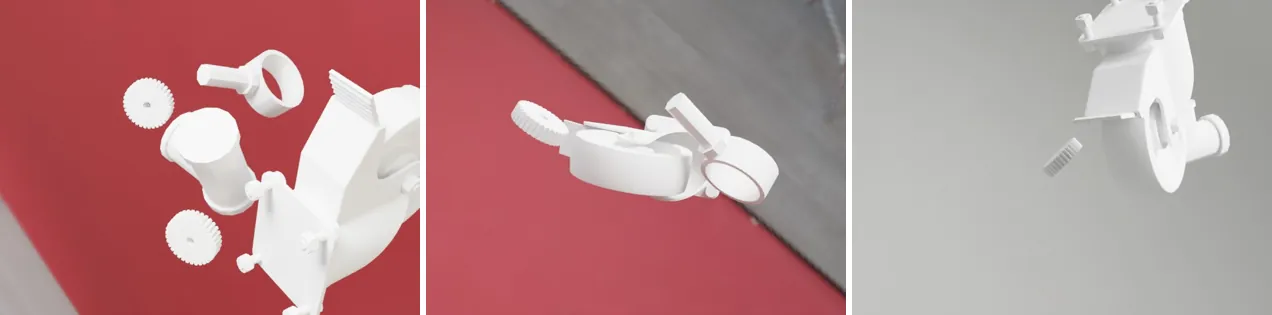
groups="parts"tags all four models, so later nodes can target them as a group.uv_mapping="cube"gives them texture coordinates, which the texture-based materials in step 2 need.ModelInstanceRandomizershows three to six parts per scene: up to three gears, two pipes, two fixtures and one wheel.float_in_airis your pose function.ModelPoseRandomizercalls it for each visible part and re-samples any part that intersects another, so parts never overlap.BackgroundRandomizerwithgroups=["indoor/studio"]keeps a neutral studio backdrop for now.CameraPoseRandomizerwith theshell_samplerputs the camera 0.5–0.7 m from the parts, 20–70° above them, looking at their center.
device="CPU" runs on any machine. Use "CUDA"/"OPTIX" on an NVIDIA GPU or "METAL" on Apple silicon to render many times faster.
Step 2: Materials
The parts are all the same plain gray. Register the material pool and add a MaterialRandomizer after the pose node:
from telekinesis.illusion.randomizer.randomizer_node import MaterialRandomizer

environment.add(config.MaterialConfig.discover(assets / "materials"))

randomizer.add(
    MaterialRandomizer(config.MaterialRandomizerConfig(
        target_groups=["parts"],
        materials=[
            "metal",                                                          # a scanned metal texture set
            "plastic",                                                        # a scanned plastic texture set
            config.PrincipledMaterialConfig("metal", surface_imperfections=True),
            config.PrincipledMaterialConfig("plastic", parameters={"base_color": ((0.6, 0.0, 0.0), (1.0, 0.3, 0.1))}),
        ],
    )),
    "materials",
)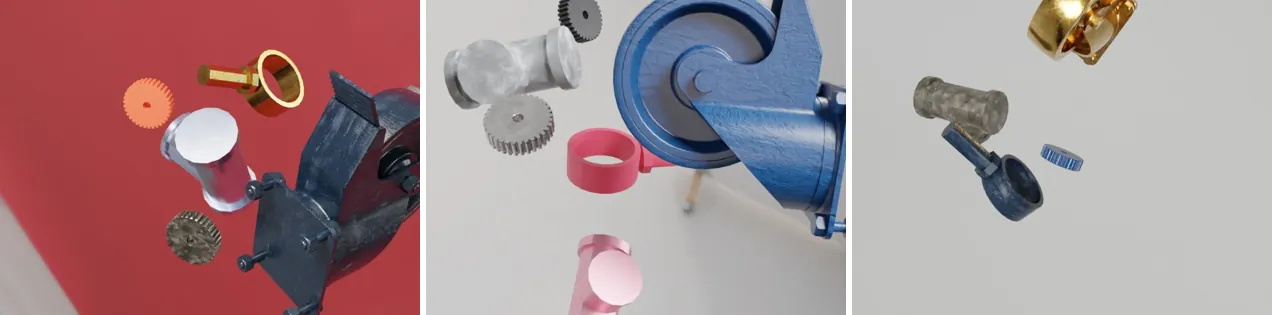
Each part draws one of four choices independently. Strings are groups of registered PBR texture sets (materials/metal/..., materials/plastic/...). PrincipledMaterialConfig entries are procedural recipes: a metal preset with scratches and smudges, and a plastic whose color is drawn from red to orange. Every range is re-sampled per part, so the recipes never repeat exactly.
Order matters
Nodes run in the order they are added, and the camera should come last so it aims at the final scene. In the complete script below, the nodes from steps 2 and 3 sit between "poses" and "camera".
Step 3: Backgrounds and Lights
Now open up the backdrop to every registered HDRI, and let the key light change strength, color, size and position:
from telekinesis.illusion.randomizer.randomizer_node import LightPoseRandomizer, LightRandomizer

# swap the step-1 background node for one that picks from every registered HDRI
randomizer.replace_randomizer("background", BackgroundRandomizer(config.BackgroundRandomizerConfig()))

randomizer.add(
    LightRandomizer(config.LightRandomizerConfig(properties={
        "power": {"min": 20.0, "max": 120.0},
        "color": {"min": (0.8, 0.8, 0.9), "max": (1.0, 1.0, 1.0)},
        "size": {"min": 0.2, "max": 0.8},
    }), ["key"]),
    "key_light",
)
randomizer.add(
    LightPoseRandomizer(config.LightPoseRandomizerConfig(
        min_distance=0.3,
        params={"radius_min": 0.8, "radius_max": 1.5, "elevation_min": 30.0, "elevation_max": 80.0},
    ), ["key"]),
    "key_pose",
)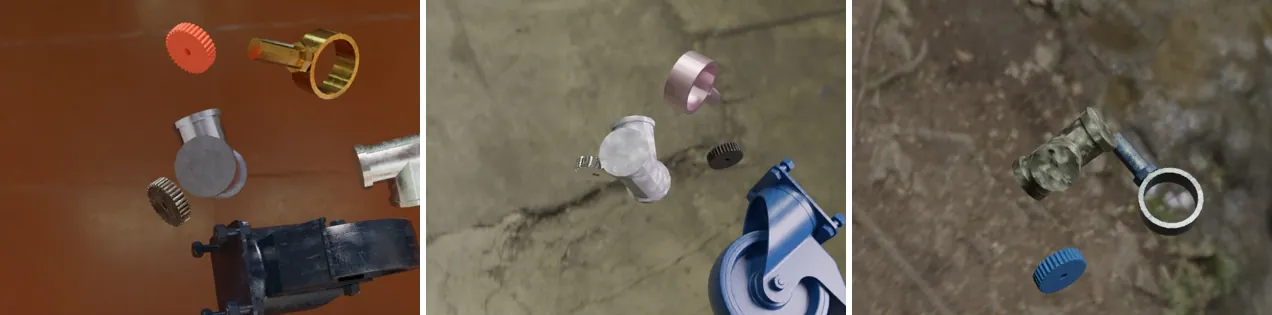
replace_randomizer()swaps the node registered as"background"in place, keeping its position in the randomizer.BackgroundRandomizerConfig()with no groups selects from every registered HDRI: industrial halls, studios and outdoor scenes. The HDRI lights the parts too, so reflections and shadows change with it.LightRandomizerdraws a new power, color and emitter size for thekeylight in every scene.{min, max}means "uniform in this range"; a fixed value would keep the property constant.LightPoseRandomizermoves the light onto a shell 0.8–1.5 m around the parts, 30–80° up, aimed at them, and rejects poses closer than 0.3 m to any part.
Step 4: More Views per Scene
Rendering is cheap compared with setting up a scene. Render each scene from three viewpoints by changing one value in the camera node:
CameraPoseRandomizer(config.CameraPoseRandomizerConfig(
    sampler="shell_sampler",
    number_of_views=3,
    params={"radius_min": 0.5, "radius_max": 0.7, "elevation_min": 20.0, "elevation_max": 70.0},
))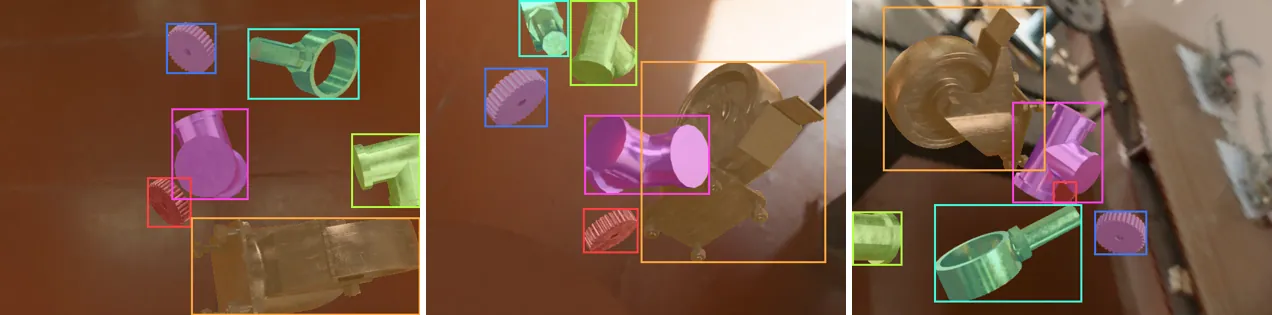
Now generate(num_images=30) renders 10 scenes with three views each. The overlay shows what is in coco_annotations.json: one RLE mask, one box and one category per visible part, with partly hidden parts masked only where they are visible.
The Complete Script
"""Object based SDG: mechanical parts in mid-air, randomized in every way."""

import numpy as np

from telekinesis.illusion import config
from telekinesis.illusion.core.engine import BlenderEngine
from telekinesis.illusion.core.environment import Environment
from telekinesis.illusion.core.synthetic_data_generator import SyntheticDataGenerator
from telekinesis.illusion.randomizer.randomizer import Randomizer
from telekinesis.illusion.randomizer.randomizer_node import (
    BackgroundRandomizer,
    CameraPoseRandomizer,
    LightPoseRandomizer,
    LightRandomizer,
    MaterialRandomizer,
    ModelInstanceRandomizer,
    ModelPoseRandomizer,
)
from telekinesis.illusion.types.model import Model
from telekinesis.illusion.utils.assets import resolve_asset_dir
from telekinesis.illusion.writer.writer import CocoWriter

assets = resolve_asset_dir()

# Environment: camera, one light, four parts, and the material and HDRI pools
environment = Environment()
environment.add(config.CameraConfig(image_width=640, image_height=480))
environment.add(config.LightConfig("key", "AREA", location=(0.0, -0.5, 1.0), properties={"power": 60.0, "size": 0.5}))
for part in ["gearwheel_1", "pipe_1", "pipe_fixture_1", "heavy_duty_wheel"]:
    environment.add(config.ModelConfig.from_path(assets / f"models/mechanical_parts/{part}.glb", groups="parts", uv_mapping="cube"))
environment.add(config.MaterialConfig.discover(assets / "materials"))
environment.add(config.BackgroundConfig.discover(assets / "hdris"))


def float_in_air(model: Model) -> None:
    model.set_location(np.random.uniform((-0.12, -0.12, 0.0), (0.12, 0.12, 0.2)))
    model.set_rotation(np.random.uniform(-np.pi, np.pi, size=3))


# Randomizer: one node per axis of variation, camera last
randomizer = Randomizer()
randomizer.add(
    ModelInstanceRandomizer(config.InstanceRandomizerConfig(
        counts={"gearwheel_1": (0, 3), "pipe_1": (0, 2), "pipe_fixture_1": (0, 2), "heavy_duty_wheel": (0, 1)},
        min_num_total_models=3,
        max_num_total_models=6,
    )),
    "instances",
)
randomizer.add(ModelPoseRandomizer(config.ModelPoseRandomizerConfig(), float_in_air), "poses")
randomizer.add(BackgroundRandomizer(config.BackgroundRandomizerConfig()), "background")
randomizer.add(
    MaterialRandomizer(config.MaterialRandomizerConfig(
        target_groups=["parts"],
        materials=[
            "metal",
            "plastic",
            config.PrincipledMaterialConfig("metal", surface_imperfections=True),
            config.PrincipledMaterialConfig("plastic", parameters={"base_color": ((0.6, 0.0, 0.0), (1.0, 0.3, 0.1))}),
        ],
    )),
    "materials",
)
randomizer.add(
    LightRandomizer(config.LightRandomizerConfig(properties={
        "power": {"min": 20.0, "max": 120.0},
        "color": {"min": (0.8, 0.8, 0.9), "max": (1.0, 1.0, 1.0)},
        "size": {"min": 0.2, "max": 0.8},
    }), ["key"]),
    "key_light",
)
randomizer.add(
    LightPoseRandomizer(config.LightPoseRandomizerConfig(
        min_distance=0.3,
        params={"radius_min": 0.8, "radius_max": 1.5, "elevation_min": 30.0, "elevation_max": 80.0},
    ), ["key"]),
    "key_pose",
)
randomizer.add(
    CameraPoseRandomizer(config.CameraPoseRandomizerConfig(
        sampler="shell_sampler",
        number_of_views=3,
        params={"radius_min": 0.5, "radius_max": 0.7, "elevation_min": 20.0, "elevation_max": 70.0},
    )),
    "camera",
)

# Generate
generator = SyntheticDataGenerator(
    environment=environment,
    randomizer=randomizer,
    writer=CocoWriter(output_dir="output/object_based_sdg"),
    engine=BlenderEngine(config.RenderConfig(device="CPU", samples=32)),
)
generator.generate(num_images=30)
Run it with python object_based_sdg.py. The log ends with Generation complete: 30 images from 10 samples., and the dataset is in output/object_based_sdg/:
output/object_based_sdg/
├── coco_annotations.json
└── images/
    ├── 000000.jpg
    └── ...
Open it in the built-in viewer to check the labels:
python -m telekinesis.illusion.viewer.shard_viewer -d output/object_based_sdgReproducible runs
Seed Python's and NumPy's random generators (random.seed(0), np.random.seed(0)) at the top of the script to get the same sequence of scenes again. Nodes with a seed field, such as MaterialRandomizerConfig and LightRandomizerConfig, can also be seeded individually.