

Config Based Synthetic Dataset Generation
Goal: Generate, merge and export a complete bin-picking dataset from one YAML file, ready to train a model with Iris.
Level: Intermediate
Time: ~20 minutes
SUMMARY
The quickstarts build scenes in Python, which is the right way to experiment. A production dataset runs for hours, has to survive interruptions, and has to end up in a format a trainer reads. A worker handles that: the whole dataset lives in one YAML file, and three lines of Python render it in shards, merge them and export a train/valid/test split.
This tutorial uses telekinesis-illusion 0.3.2.
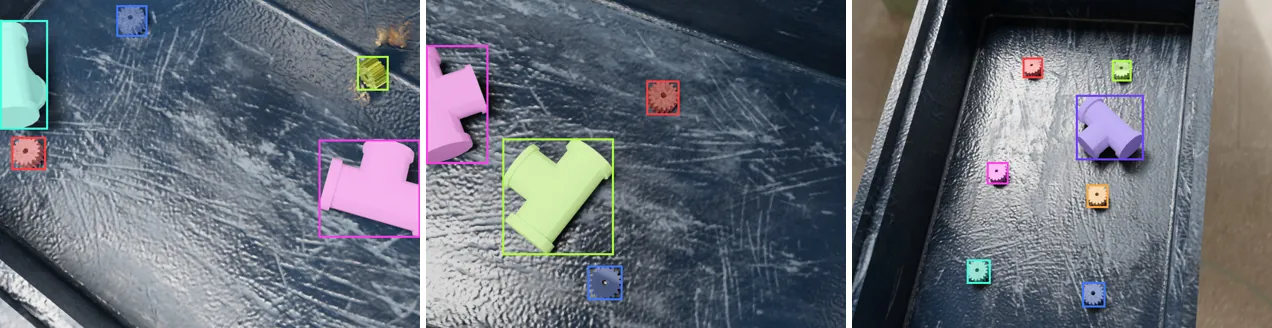
Describe the dataset
Create bin_picking.yaml and start with what to produce:
dataset:
  name: gears_in_bins
  num_images: 12
  output_directory: output
  shard:
    size: 6                     # images per shard directory
  writer:
    dataset_format: yolo        # coco, yolo, or null to only merge
    split_ratios: [0.7, 0.2, 0.1]

renderer:
  device: METAL                 # CUDA, OPTIX, HIP, METAL or CPU

camera:
  image_width: 820
  image_height: 640
  field_of_view: 0.69           # radians

physics:
  active: true
  min_simulation_time_range: [0.1, 0.2]
  max_simulation_time_range: [0.3, 1.0]
  check_model_interval: 0.5
dataset names the output (output/gears_in_bins/), the size of the run, and how to split it: 12 images in two shards of 6, exported as YOLO with a 70/20/10 split. renderer.device picks the GPU backend; use CPU if you have none. The physics timings are short because small parts settle within a fraction of a second.
No asset_directory is given, so the example assets are used (downloaded on first use). Point it at your own folder (relative to this YAML file) when you use your own CAD models.
Add the models and the light
models:
  - model_name: gearwheel_2
    model_path: models/mechanical_parts/gearwheel_2.glb
    groups: [part]
    category_name: gear
    category_id: 1
    active_in_simulation: true
    shading: AUTO_SMOOTH

  - model_name: plastic_bin_2
    model_path: models/bins/plastic_bin_2.glb
    groups: [container]
    category_name: distractor   # not annotated
    collision_shape: MESH

  - model_name: pipe_1
    model_path: models/mechanical_parts/pipe_1.glb
    groups: [distractor]
    category_name: pipe
    category_id: 2
    active_in_simulation: true

lights:
  - light_name: key
    light_type: AREA
Each model has exactly one role in groups: the gear is the part the dataset is about, the bin is the container everything falls into, and the pipe is a distractor, clutter that the detector should learn to tell apart. Here it is labeled as its own category (pipe); set its category_name to distractor to leave it unlabeled instead.
Place the parts
pose_sampling:
  strategy: grid
  min_height: 0.05
  max_height: 0.08
  face_sample_range: [0.1, 0.9]
  grid:
    rows: 3
    cols: 2
    xy_jitter: 0.1
    z_rotation_range: [-180.0, 180.0]
Parts start on a 3 × 2 grid over the bin's floor, 5–8 cm above it, each rotated randomly about the vertical axis, and then physics lets them drop. strategy: random would instead start them at random positions and orientations. That gives messier piles, where the grid gives neat, well-separated rows.
Randomize everything else
randomizers:
  instance:
    part:
      counts: {gearwheel_2: [1, 6]}
    container:
      counts: {plastic_bin_2: [1, 1]}
    distractor:
      counts: {pipe_1: [0, 2]}

  material:
    parts:
      target_groups: [part]
      groups: [metal]
    bins:
      target_groups: [container]
      groups: [plastic]

  background:
    groups: [indoor/industrial]

  light:
    key:
      properties:
        power: {min: 40.0, max: 100.0}
        size: {min: 0.3, max: 0.6}

  light_pose:
    key:
      sampler: shell_sampler
      params:
        center: [plastic_bin_]
        radius_min: 1.2
        radius_max: 1.6
        elevation_min: 50.0
        elevation_max: 80.0

  camera_pose:
    sampler: volume_sampler
    number_of_views: 2
    params:
      point_of_interst: [0.0, 0.0, 0.0]
      distance_range: [0.4, 0.9]
These are the same randomizer nodes as in Python, one section each: one to six gears and up to two pipes per scene; metal parts in a plastic bin; an industrial HDRI; a key light of varying strength and size circling the bin; and two camera views per scene from 0.4–0.9 m above the bin center.
Run it
from telekinesis.illusion.workers.bin_picking_worker import BinPickingWorker

worker = BinPickingWorker("bin_picking.yaml")
worker.generate()
worker.merge_shards(preview=False)
The constructor validates the whole file first, so a typo fails in the first second rather than an hour into the run:
ValueError: Invalid configuration file 'bin_picking.yaml': dataset.num_image: unknown key(s) for DatasetConfig. Valid keys are ['asset_directory', 'name', 'num_images', 'output_directory', 'shard', 'writer'].generate() renders the shards; the log reports Generation complete: 6 images from 3 samples. once per shard. merge_shards() then writes merged_coco_annotations.json (12 images, ...annotations) and the YOLO export:
output/gears_in_bins/
├── config.yaml               # the YAML above, with version and timestamp
├── shard_<date>_<id>/  (×2)
├── merged_coco_annotations.json
└── yolo_format/              # data.yaml, images/ and labels/ per split
Scale It Up
Once the smoke test looks right, raise dataset.num_images (e.g. 20,000) and dataset.shard.size (e.g. 500), and set dataset.writer.max_size_gb as a safety cap. Finished shards are kept if a run stops, and several workers can share one output folder; see Running a Worker.
To retarget the dataset to your own part, change the part model's model_path, model_name and category_name, and update the names under randomizers.instance.part.counts. Every other section keeps working. The Worker YAML Reference lists every key, and the published synthetic datasets show what this pipeline produces at scale.
Interactive tuning
The deprecated Blender extension used to let you tune a worker config visually. It currently only works with the previously released telekinesis-illusion 0.1.1 and its old configuration format, not with 0.3.2. An update is coming soon.
Next Step: Train a Model with Iris
The dataset is ready to train on. Iris (telekinesis-iris) trains, evaluates and exports detection and instance-segmentation models such as RF-DETR, YOLOX and SAM3-LoRA.
Iris reads COCO datasets, so set the export format to coco before you generate:
dataset:
  writer:
    dataset_format: coco
The worker then writes output/gears_in_bins/coco_format/ with train/, valid/ and test/ folders, each holding its images and an _annotations.coco.json. That is the Roboflow-style layout Prepare a Dataset describes, including the explicit valid/ split, with the instance masks Iris needs for segmentation models. To convert a dataset you already generated as YOLO, re-export its merged annotations with DatasetConverter.