

Physics Based Synthetic Dataset Generation
Goal: Generate a physically simulated bin-picking dataset: parts dropped into a container, settled by physics, and rendered from above.
Level: Beginner
Time: ~15 minutes
SUMMARY
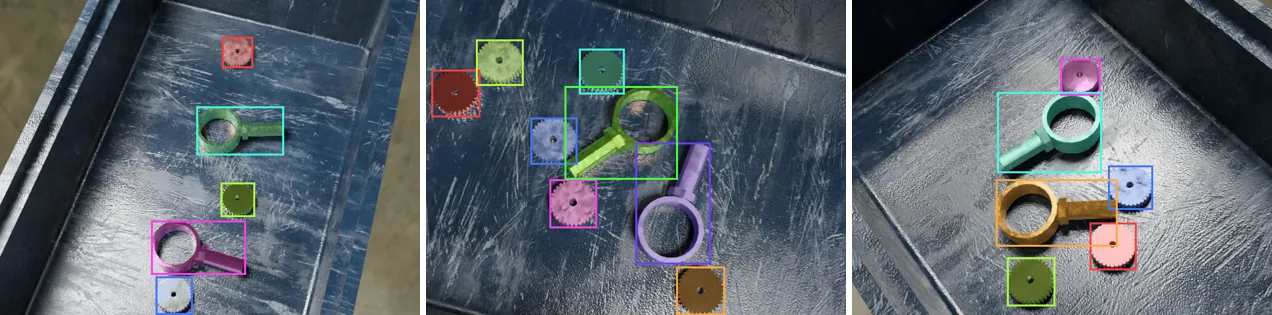
Real bins are not tidy. Parts lean on each other, lie on their sides and slide into corners. Instead of hand-placing them, you drop them from above and let the physics simulation settle them, so every scene is a plausible, physically consistent pile.
This tutorial builds on Object Based Synthetic Dataset Generation and uses telekinesis-illusion 0.3.2.
What Changes from Object Based SDG
Four things turn floating parts into a bin-picking scene.
1. A container that parts can fall into
environment.add(config.ModelConfig.from_path(
    assets / "models/bins/plastic_bin_2.glb", model_name="bin", category_name="distractor",
    groups="bins", uv_mapping="cube", collision_shape="MESH",
))collision_shape="MESH"uses the bin's actual geometry for collisions. The default,CONVEX_HULL, would wrap the bin in a solid lid, and parts would land on top of it instead of falling inside.category_name="distractor"renders the bin but leaves it out of the annotations: the detector should learn the parts, not the container.- The bin keeps
active_in_simulation=False(the default), so it does not move.
2. Parts that take part in the simulation
environment.add(config.ModelConfig.from_path(
    assets / "models/mechanical_parts/gearwheel_1.glb", model_name="gear", groups="parts",
    uv_mapping="cube", active_in_simulation=True,
))
Only models with active_in_simulation=True fall, collide and come to rest.
3. A drop pose instead of a floating pose
def drop_above_bin(model: Model) -> None:
    model.set_location(np.random.uniform((-0.12, -0.08, 0.15), (0.12, 0.08, 0.35)))
    model.set_rotation(np.random.uniform(-np.pi, np.pi, size=3))
The pose function now only has to start each part somewhere above the bin opening; gravity does the rest. The bin gets its own ModelInstanceRandomizer, so exactly one bin is visible while the parts vary independently:
randomizer.add(
    ModelInstanceRandomizer(config.InstanceRandomizerConfig(counts={"gear": (2, 6), "fixture": (0, 2)})), "parts"
)
randomizer.add(ModelInstanceRandomizer(config.InstanceRandomizerConfig(counts={"bin": (1, 1)})), "bin")
randomizer.add(
    ModelPoseRandomizer(config.ModelPoseRandomizerConfig(), drop_above_bin, target_models=["gear", "fixture"]), "drop"
)
target_models limits the pose node to the parts, so the bin stays where it was registered.
4. Physics on, and a camera above the bin
engine = BlenderEngine(
    config.RenderConfig(device="CPU", samples=32),
    config.PhysicsConfig(active=True),
)

CameraPoseRandomizer(config.CameraPoseRandomizerConfig(
    sampler="volume_sampler",
    number_of_views=2,
    params={"point_of_interst": ["bin"], "distance_range": [0.5, 0.8], "inplane_rot_min": -30.0, "inplane_rot_max": 30.0},
))
With PhysicsConfig(active=True), every scene is simulated after the randomizer runs and before the camera renders. The simulation stops as soon as the parts have stopped moving (at most a few simulated seconds), and parts that miss the bin and fall below it are removed from the scene and its annotations automatically.
The volume_sampler places the camera 0.5–0.8 m from the bin, aimed at it (point_of_interst takes model-name prefixes and really is spelled that way), with up to ±30° of roll. That is what an overhead camera above a picking cell sees.
The Complete Script
"""Physics based SDG: parts dropped into a container and settled with physics."""

import numpy as np

from telekinesis.illusion import config
from telekinesis.illusion.core.engine import BlenderEngine
from telekinesis.illusion.core.environment import Environment
from telekinesis.illusion.core.synthetic_data_generator import SyntheticDataGenerator
from telekinesis.illusion.randomizer.randomizer import Randomizer
from telekinesis.illusion.randomizer.randomizer_node import (
    BackgroundRandomizer,
    CameraPoseRandomizer,
    LightPoseRandomizer,
    LightRandomizer,
    MaterialRandomizer,
    ModelInstanceRandomizer,
    ModelPoseRandomizer,
)
from telekinesis.illusion.types.model import Model
from telekinesis.illusion.utils.assets import resolve_asset_dir
from telekinesis.illusion.writer.writer import CocoWriter

assets = resolve_asset_dir()

environment = Environment()
environment.add(config.CameraConfig(image_width=640, image_height=480))
environment.add(config.LightConfig("key", "AREA", properties={"power": 80.0, "size": 0.4}))

# Parts fall and collide; the bin stays put and is not annotated
environment.add(config.ModelConfig.from_path(
    assets / "models/mechanical_parts/gearwheel_1.glb", model_name="gear", groups="parts",
    uv_mapping="cube", active_in_simulation=True,
))
environment.add(config.ModelConfig.from_path(
    assets / "models/mechanical_parts/pipe_fixture_1.glb", model_name="fixture", groups="parts",
    uv_mapping="cube", shading="SMOOTH", active_in_simulation=True,
))
environment.add(config.ModelConfig.from_path(
    assets / "models/bins/plastic_bin_2.glb", model_name="bin", category_name="distractor",
    groups="bins", uv_mapping="cube", collision_shape="MESH",
))
environment.add(config.MaterialConfig.discover(assets / "materials"))
environment.add(config.BackgroundConfig.discover(assets / "hdris"))


def drop_above_bin(model: Model) -> None:
    model.set_location(np.random.uniform((-0.12, -0.08, 0.15), (0.12, 0.08, 0.35)))
    model.set_rotation(np.random.uniform(-np.pi, np.pi, size=3))


randomizer = Randomizer()
randomizer.add(
    ModelInstanceRandomizer(config.InstanceRandomizerConfig(counts={"gear": (2, 6), "fixture": (0, 2)})), "parts"
)
randomizer.add(ModelInstanceRandomizer(config.InstanceRandomizerConfig(counts={"bin": (1, 1)})), "bin")
randomizer.add(
    ModelPoseRandomizer(config.ModelPoseRandomizerConfig(), drop_above_bin, target_models=["gear", "fixture"]), "drop"
)
randomizer.add(
    MaterialRandomizer(config.MaterialRandomizerConfig(target_groups=["parts"], groups=["metal"])), "part_materials"
)
randomizer.add(
    MaterialRandomizer(config.MaterialRandomizerConfig(target_groups=["bins"], groups=["plastic"])), "bin_material"
)
randomizer.add(
    BackgroundRandomizer(config.BackgroundRandomizerConfig(groups=["indoor/industrial"])), "background"
)
randomizer.add(
    LightRandomizer(config.LightRandomizerConfig(properties={"power": {"min": 40.0, "max": 120.0}}), ["key"]),
    "key_light",
)
randomizer.add(
    LightPoseRandomizer(config.LightPoseRandomizerConfig(
        params={"center": ["bin"], "radius_min": 1.0, "radius_max": 1.5, "elevation_min": 50.0, "elevation_max": 80.0},
    ), ["key"]),
    "key_pose",
)
randomizer.add(
    CameraPoseRandomizer(config.CameraPoseRandomizerConfig(
        sampler="volume_sampler",
        number_of_views=2,
        params={"point_of_interst": ["bin"], "distance_range": [0.5, 0.8], "inplane_rot_min": -30.0, "inplane_rot_max": 30.0},
    )),
    "camera",
)

generator = SyntheticDataGenerator(
    environment=environment,
    randomizer=randomizer,
    writer=CocoWriter(output_dir="output/physics_based_sdg"),
    engine=BlenderEngine(
        config.RenderConfig(device="CPU", samples=32),
        config.PhysicsConfig(active=True),
    ),
)
generator.generate(num_images=20)
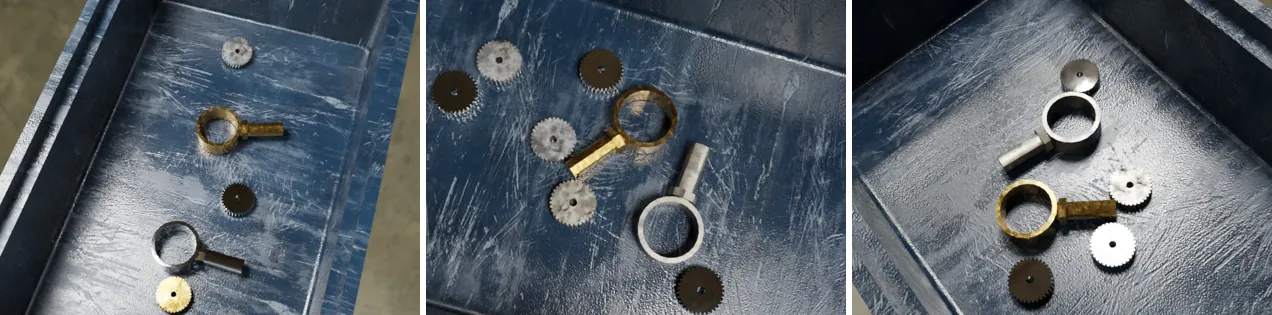
Two MaterialRandomizer nodes give parts and bin different material families by targeting their groups. The light's center: ["bin"] keeps the key light circling the bin rather than the parts.
Moving a static model
Static models stay where they were registered, at the origin. To move one, prepare the generator first so the meshes exist, then set the pose, then generate:
generator.prepare()
environment.get_models_by_name("bin").set_location((0.0, 0.0, -0.05))
generator.generate(num_images=20)
Physics settings for small parts
The default PhysicsConfig simulates 0.5–1 s at least and up to 2–5 s. Small, light parts usually settle much sooner: the worker example uses min_simulation_time_range=(0.1, 0.2), max_simulation_time_range=(0.3, 1.0) and check_model_interval=0.5 to cut simulation time per scene. If parts tunnel through thin walls, raise substeps_per_frame.