

Build the Scene from Script
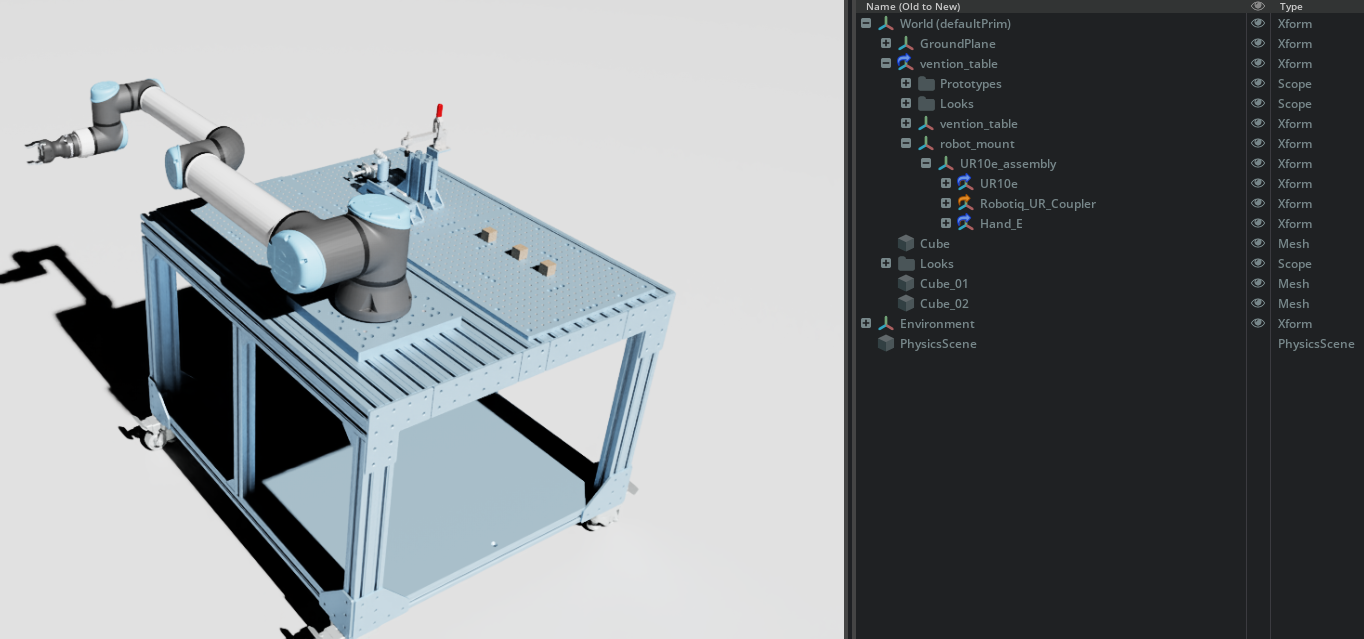
Generate the same scene with a Python script. The script downloads the sample scene, the Universal Robots UR10e, the Robotiq UR Coupler and the Robotiq Hand-E from the Telekinesis asset library, assembles them as Add Robot, Add Mesh and Add Tool do, and saves the scene as a USD file. Use it as a reference for scenes with other robots and grippers: change the asset paths, the mount link, the gripper offset and the driven finger joint.
Prerequisites
Install Isaac Sim, the Telekinesis extension and the matched SDK packages first, as described in Install Isaac Sim Extension.
Save the Script
Save this script as pick_and_place_scene.py.
import pathlib
import shutil
import urllib.request
import zipfile

from pxr import Gf, Sdf, Usd, UsdGeom, UsdPhysics

ASSET_ROOT = "https://assets.telekinesis.ai"
CACHE_DIRECTORY = pathlib.Path.home() / ".cache" / "telekinesis"
OUTPUT_PATH = pathlib.Path(__file__).resolve().parent / "pick_and_place_scene.usda"

ASSEMBLY_PATH = "/World/vention_table/robot_mount/UR10e_assembly"
ROBOT_PATH = f"{ASSEMBLY_PATH}/UR10e"
COUPLER_PATH = f"{ASSEMBLY_PATH}/Robotiq_UR_Coupler"
GRIPPER_PATH = f"{ASSEMBLY_PATH}/Hand_E"
MOUNT_LINK = "wrist_3_link"
# Hand-E origin above the mount link: on the coupler's top face, 14 mm above the flange.
GRIPPER_OFFSET_Z = 0.014  # m

# The extension's names for the joint that holds a mounted prim and for its tags.
MOUNT_JOINT_NAME = "AssemblerFixedJoint"
ASSEMBLY_ROBOT_RELATIONSHIP = "telekinesis:assemblyRobot"
ARTICULATION_ID_ATTRIBUTE = "telekinesis:articulation:id"
DRIVEN_JOINTS_ATTRIBUTE = "telekinesis:articulation:driven_joints"
MOUNT_LINK_ATTRIBUTE = "telekinesis:mountLink"
# The Synapse class the Telekinesis Isaac Sim Server loads the robot as, for its poses.
ROBOT_CLASS_NAME_ATTRIBUTE = "telekinesis:robot:class_name"
ROBOT_CLASS_NAME = "universalrobotsur10e"


def download_asset(key: str) -> pathlib.Path:
    """Download an asset of the Telekinesis asset library into the cache, once.

    ``key`` is the asset's path in the library, such as ``usd/couplers/x.usda``. A ZIP
    bundle is extracted into a folder named after it, and that folder is returned; any
    other file is stored as it is, and its path is returned. Later calls return the
    cached copy without downloading. A download is written under a temporary name and
    renamed at the end, so an interrupted run never leaves a partial copy behind.

    Raises:
        urllib.error.URLError: If the asset cannot be downloaded.
    """
    target = CACHE_DIRECTORY / key
    if key.endswith(".zip"):
        target = target.with_suffix("")
    if target.exists():
        return target

    print(f"Downloading {ASSET_ROOT}/{key}")
    target.parent.mkdir(parents=True, exist_ok=True)
    download_path = target.with_name(f".{target.name}.download")
    urllib.request.urlretrieve(f"{ASSET_ROOT}/{key}", download_path)
    if key.endswith(".zip"):
        staging_directory = target.with_name(f".{target.name}.staging")
        shutil.rmtree(staging_directory, ignore_errors=True)
        with zipfile.ZipFile(download_path) as archive:
            archive.extractall(staging_directory)
        download_path.unlink()
        download_path = staging_directory
    download_path.rename(target)
    return target


def place_prim_at(prim: Usd.Prim, world_transform: Gf.Matrix4d) -> None:
    """Author ``prim``'s transform so that it lands at ``world_transform`` in the stage.

    The transform is written relative to the prim's parent, as a translation and an
    orientation, on a prim that authors no transform yet.
    """
    parent_world = UsdGeom.Xformable(prim.GetParent()).ComputeLocalToWorldTransform(
        Usd.TimeCode.Default()
    )
    local = Gf.Transform(world_transform * parent_world.GetInverse())
    xformable = UsdGeom.Xformable(prim)
    xformable.AddTranslateOp(UsdGeom.XformOp.PrecisionDouble).Set(local.GetTranslation())
    xformable.AddOrientOp(UsdGeom.XformOp.PrecisionDouble).Set(local.GetRotation().GetQuat())


def create_mount_joint(
    stage: Usd.Stage, mount_link_path: str, body_path: str, offset: Gf.Vec3d
) -> None:
    """Fix the rigid body at ``body_path`` to the arm's mount link, as the extension does.

    The joint is authored beneath the body, holds the body's origin at ``offset`` in the
    mount link's frame with the same orientation, and stays in the arm's articulation, so
    the body becomes one more link of the arm without adding a degree of freedom.
    """
    joint = UsdPhysics.FixedJoint.Define(stage, f"{body_path}/{MOUNT_JOINT_NAME}")
    joint.CreateBody0Rel().SetTargets([Sdf.Path(mount_link_path)])
    joint.CreateBody1Rel().SetTargets([Sdf.Path(body_path)])
    joint.CreateLocalPos0Attr(Gf.Vec3f(offset))
    joint.CreateLocalRot0Attr(Gf.Quatf(1.0))
    joint.CreateLocalPos1Attr(Gf.Vec3f(0.0))
    joint.CreateLocalRot1Attr(Gf.Quatf(1.0))


def main() -> None:
    """Download the assets, assemble the robot on the sample scene and save the result."""
    scene_file = (
        download_asset("usd/environments/pick_and_place/pick_and_place_scene.zip")
        / "pick_and_place_scene.usd"
    )
    robot_file = download_asset("usd/robots/manipulators/universal_robots/ur10e.zip") / "ur10e.usda"
    gripper_file = (
        download_asset("usd/tools/parallel_grippers/robotiq/robotiqhande.zip")
        / "Robotiq_Hand_E.usda"
    )
    coupler_file = download_asset("usd/couplers/Robotiq_UR_Coupler.usda")

    # The sample scene is layered beneath the output rather than copied into it, so its
    # links to the table, which are relative to its own folder, keep resolving.
    stage = Usd.Stage.CreateNew(str(OUTPUT_PATH))
    stage.GetRootLayer().subLayerPaths.append(scene_file.as_posix())
    stage.SetDefaultPrim(stage.GetPrimAtPath("/World"))
    UsdGeom.SetStageMetersPerUnit(stage, 1.0)
    UsdGeom.SetStageUpAxis(stage, UsdGeom.Tokens.z)
    # Timing is read from the root layer only, so the sample scene's would be lost.
    scene_layer = Sdf.Layer.FindOrOpen(scene_file.as_posix())
    stage.SetTimeCodesPerSecond(scene_layer.timeCodesPerSecond)
    stage.SetStartTimeCode(scene_layer.startTimeCode)
    stage.SetEndTimeCode(scene_layer.endTimeCode)

    # The assembly Xform makes everything mounted in it part of the robot, as Add Robot
    # builds it.
    assembly = UsdGeom.Xform.Define(stage, ASSEMBLY_PATH).GetPrim()
    assembly.CreateRelationship(ASSEMBLY_ROBOT_RELATIONSHIP).SetTargets([Sdf.Path(ROBOT_PATH)])

    robot = stage.DefinePrim(ROBOT_PATH)
    robot.GetReferences().AddReference(robot_file.as_posix(), "/ur10e_robot")
    robot.CreateAttribute(ARTICULATION_ID_ATTRIBUTE, Sdf.ValueTypeNames.String).Set("")
    robot.CreateAttribute(MOUNT_LINK_ATTRIBUTE, Sdf.ValueTypeNames.String).Set(MOUNT_LINK)
    robot.CreateAttribute(ROBOT_CLASS_NAME_ATTRIBUTE, Sdf.ValueTypeNames.String).Set(
        ROBOT_CLASS_NAME
    )

    mount_link_path = f"{ROBOT_PATH}/{MOUNT_LINK}"
    mount_link_world = UsdGeom.Xformable(
        stage.GetPrimAtPath(mount_link_path)
    ).ComputeLocalToWorldTransform(Usd.TimeCode.Default())

    # The coupler is mounted as Add Mesh mounts a prim: a dynamic rigid body colliding as
    # convex hulls, fixed to the mount link, and not colliding with the robot it sits on.
    coupler = stage.DefinePrim(COUPLER_PATH)
    coupler.GetReferences().AddReference(coupler_file.as_posix(), "/Robotiq_UR_coupler")
    place_prim_at(coupler, mount_link_world)
    UsdPhysics.RigidBodyAPI.Apply(coupler).CreateKinematicEnabledAttr(False)
    for descendant in Usd.PrimRange(coupler):
        if descendant.IsA(UsdGeom.Mesh):
            UsdPhysics.CollisionAPI.Apply(descendant)
            # PhysX cannot simulate a triangle mesh on a moving body.
            UsdPhysics.MeshCollisionAPI.Apply(descendant).CreateApproximationAttr(
                UsdPhysics.Tokens.convexHull
            )
    UsdPhysics.FilteredPairsAPI.Apply(coupler).CreateFilteredPairsRel().SetTargets(
        [Sdf.Path(ROBOT_PATH)]
    )
    create_mount_joint(stage, mount_link_path, COUPLER_PATH, Gf.Vec3d(0.0))

    # The Hand-E is merged into the robot's articulation as Add Tool merges it: its own
    # articulation root is removed, its weld to the world is deactivated, and its base
    # link is fixed to the mount link on top of the coupler.
    gripper = stage.DefinePrim(GRIPPER_PATH)
    gripper.GetReferences().AddReference(gripper_file.as_posix(), "/Robotiq_Hand_E")
    gripper_offset = Gf.Vec3d(0.0, 0.0, GRIPPER_OFFSET_Z)
    place_prim_at(gripper, Gf.Matrix4d().SetTranslate(gripper_offset) * mount_link_world)
    stage.GetPrimAtPath(f"{GRIPPER_PATH}/Robotiq_Hand_E").RemoveAPI(UsdPhysics.ArticulationRootAPI)
    stage.GetPrimAtPath(f"{GRIPPER_PATH}/Robotiq_Hand_E/root_joint").SetActive(False)
    create_mount_joint(
        stage, mount_link_path, f"{GRIPPER_PATH}/Robotiq_Hand_E/base_link", gripper_offset
    )
    gripper.CreateAttribute(ARTICULATION_ID_ATTRIBUTE, Sdf.ValueTypeNames.String).Set("")
    gripper.CreateAttribute(DRIVEN_JOINTS_ATTRIBUTE, Sdf.ValueTypeNames.TokenArray).Set(
        ["left_finger_joint"]
    )

    stage.GetRootLayer().Save()
    print(f"Wrote {OUTPUT_PATH}")


if __name__ == "__main__":
    main()
Generate the Scene
Run the script in the SDK environment from Install the Compatible SDK Client. Isaac Sim does not need to be running.
python -m pip install usd-core
python pick_and_place_scene.py
The first run downloads about 200 MB of assets to ~/.cache/telekinesis/usd, which later runs reuse. The scene is saved as pick_and_place_scene.usda next to the script.
Open the Scene
In Isaac Sim, select File ▸ Open and choose pick_and_place_scene.usda. When the scene opens, the Telekinesis extension registers the robot and the gripper.
Limitations
- The scene references the downloaded assets by absolute path and opens only on the computer that generated it. On another computer, run the script there.
- The script is tested with the versions in the compatibility table. Other Isaac Sim or bridge versions may name prims or attributes differently.
- Downloaded assets are not updated automatically. To fetch the latest version of an asset, delete its folder under
~/.cache/telekinesis/usdand run the script again.
Run Example
With the scene open in Isaac Sim, copy the code below and run it in the SDK environment from Install the Compatible SDK Client.
WARNING
The prim paths in the code must match the Stage tree. If you renamed a prim, update the paths.
from telekinesis.synapse.robots.manipulators import universal_robots
from telekinesis.synapse.tools.parallel_grippers import robotiq

ROBOT_PRIM_PATH = "/World/vention_table/robot_mount/UR10e_assembly/UR10e"
GRIPPER_PRIM_PATH = "/World/vention_table/robot_mount/UR10e_assembly/Hand_E"

# Cartesian poses [x, y, z, rx, ry, rz] in meters and Euler XYZ degrees, robot base frame.
PICK_POSES = [
    [0.09, 0.509, 0.15, 180, 0, 0],
    [-0.015, 0.509, 0.15, 180, 0, 0],
    [-0.134, 0.509, 0.15, 180, 0, 0],
]
PLACE_START = [-0.6, -0.1, 0.15, 180, 0, 90]
PLACE_STEP_Y = 0.04
APPROACH_OFFSET_Z = 0.1  # m, pre-pick and pre-place distance above the poses

# Joint angles in degrees.
HOME_JOINTS = [-90, -90, 90, -90, -90, 0]
INTERMEDIATE_JOINTS = [-45, -90, 90, -90, -90, 0]


def place_pose(index: int) -> list[float]:
    """Return the place pose for the object with the given index, shifted in y from PLACE_START."""
    pose = list(PLACE_START)
    pose[1] += index * PLACE_STEP_Y
    return pose


def main() -> None:
    robot = universal_robots.UniversalRobotsUR10E(name="ur10e")
    gripper = robotiq.RobotiqHandE()

    robot.connect(simulation_prim_path=ROBOT_PRIM_PATH)
    gripper.connect(simulation_prim_path=GRIPPER_PRIM_PATH)
    robot.attach_tool(gripper)

    try:
        for index, pick_pose in enumerate(PICK_POSES):
            print(f"Object {index + 1}: picking")
            robot.set_joint_positions(HOME_JOINTS)
            robot.pick(pick_pose, APPROACH_OFFSET_Z)

            robot.set_joint_positions(INTERMEDIATE_JOINTS)
            robot.place(place_pose(index), APPROACH_OFFSET_Z)
        robot.set_joint_positions(HOME_JOINTS)
    finally:
        gripper.disconnect()
        robot.disconnect()
        robot.shutdown()


if __name__ == "__main__":
    main()