

Detect Cups and Forks
This example demonstrates how to use Tzara to detect cups and forks from a webcam image. The session also shows model switching: the first version uses YOLOX, and a follow-up prompt swaps to RF-DETR.
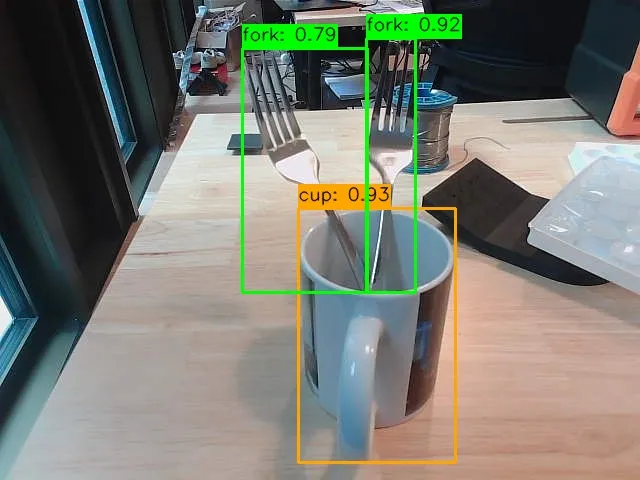
Cups and forks detected with color-coded bounding boxes
The Natural Language Instructions
Prompt 1: Also detect all the forks as well and visualize using OpenCV
Prompt 2: Use RF-DETR instead
Version 1 — YOLOX
python
import cv2
import numpy as np
from datatypes import datatypes
from datatypes.io import load_image
from telekinesis.medulla.cameras.webcam import Webcam
from telekinesis import retina

# Step 1: Connect to the webcam and capture a single frame
cam = Webcam(name="main_webcam", camera_id=0)
cam.connect()

try:
    frame_rgb = cam.capture_color_image()

    # Wrap in datatypes.Image for the detection API
    image_dt = datatypes.Image(image=frame_rgb)

    # Step 2: Run YOLOX object detection
    annotations, categories = retina.detect_objects_using_yolox(
        image=image_dt,
        score_threshold=0.25,
        nms_threshold=0.45,
    )

    # Step 3: Build a category-name lookup
    cat_id_to_name = {}
    for cat in categories.categories:
        cat_id_to_name[cat["id"]] = cat["name"]

    TARGET_CLASSES = {"cup", "fork"}

    # Color map per category (BGR for OpenCV)
    COLOR_MAP = {
        "cup":  (0, 255, 0),    # green
        "fork": (0, 0, 255),    # red
    }

    # Step 4: Draw bounding boxes
    canvas = cv2.cvtColor(frame_rgb, cv2.COLOR_RGB2BGR)

    for ann in annotations.annotations:
        cat_id   = ann["category_id"]
        cat_name = cat_id_to_name.get(cat_id, "").lower()

        if cat_name not in TARGET_CLASSES:
            continue

        bbox  = ann["bbox"]
        x, y, w, h = int(bbox[0]), int(bbox[1]), int(bbox[2]), int(bbox[3])
        score = ann.get("score", None)
        color = COLOR_MAP.get(cat_name, (255, 255, 0))

        cv2.rectangle(canvas, (x, y), (x + w, y + h), color, thickness=2)

        label = f"{cat_name}: {score:.2f}" if score is not None else cat_name
        (text_w, text_h), baseline = cv2.getTextSize(
            label, cv2.FONT_HERSHEY_SIMPLEX, 0.6, 2
        )
        cv2.rectangle(
            canvas,
            (x, y - text_h - baseline - 4),
            (x + text_w, y),
            color,
            thickness=cv2.FILLED,
        )
        cv2.putText(
            canvas, label, (x, y - baseline - 2),
            cv2.FONT_HERSHEY_SIMPLEX, 0.6, (255, 255, 255), thickness=2, lineType=cv2.LINE_AA,
        )

    # Step 5: Display and save
    cv2.imshow("Detections – cups (green) & forks (red)", canvas)
    cv2.waitKey(0)

    output_path = "annotated_detections.jpg"
    cv2.imwrite(output_path, canvas)
    print(f"Annotated image saved to: {output_path}")
finally:
    cam.disconnect()
    cv2.destroyAllWindows()
Version 2 — RF-DETR
python
import numpy as np
import cv2
from datatypes import datatypes
from telekinesis.medulla.cameras.webcam import Webcam
from telekinesis import retina

# Step 1: Connect to the webcam
cam = Webcam(name="main_webcam", camera_id=0)
cam.connect()

try:
    # Step 2: Capture a single color frame
    frame_np = cam.capture_color_image()

    # Step 3: Wrap the frame in a datatypes.Image
    image = datatypes.Image(image=frame_np)

    # Step 4: Detect objects using RF-DETR
    annotations, categories = retina.detect_objects_using_rfdetr(
        image=image,
        score_threshold=0.5,
    )

    # Step 5: Build category lookup
    cat_id_to_name = {}
    for cat in categories.categories:
        cat_id_to_name[cat["id"]] = cat["name"]

    CATEGORY_COLORS = {
        "cup":  (0, 165, 255),   # orange
        "fork": (0, 255, 0),     # green
    }
    DEFAULT_COLOR = (255, 255, 255)

    # Step 6: Draw bounding boxes
    annotated = cv2.cvtColor(frame_np, cv2.COLOR_RGB2BGR)
    target_classes = {"cup", "fork"}

    for ann in annotations.annotations:
        cat_id = ann["category_id"]
        cat_name = cat_id_to_name.get(cat_id, "unknown").lower()

        if cat_name not in target_classes:
            continue

        bbox = ann["bbox"]
        x, y, w, h = int(bbox[0]), int(bbox[1]), int(bbox[2]), int(bbox[3])
        score = ann.get("score", None)
        color = CATEGORY_COLORS.get(cat_name, DEFAULT_COLOR)

        cv2.rectangle(annotated, (x, y), (x + w, y + h), color, thickness=2)

        label = cat_name if score is None else f"{cat_name}: {score:.2f}"
        (text_w, text_h), baseline = cv2.getTextSize(
            label, cv2.FONT_HERSHEY_SIMPLEX, 0.6, 1
        )
        cv2.rectangle(
            annotated,
            (x, y - text_h - baseline - 4),
            (x + text_w, y),
            color,
            thickness=-1,
        )
        cv2.putText(
            annotated, label, (x, y - baseline - 2),
            cv2.FONT_HERSHEY_SIMPLEX, 0.6, (0, 0, 0), thickness=1, lineType=cv2.LINE_AA,
        )

    # Step 7: Display and save
    cv2.imshow("Detections - Cups & Forks (RF-DETR)", annotated)
    cv2.waitKey(0)

    output_path = "annotated_cups_forks.jpg"
    cv2.imwrite(output_path, annotated)
    print(f"Annotated image saved to: {output_path}")
finally:
    cam.disconnect()
    cv2.destroyAllWindows()